Selasa, 21 Juni 2011

SSC Epson Utility


SSC Service Utility will allow many people with high printing demands to save some money (program works with both black and color cartridges).

Up to day, SSC Service Utility works with both the LPT and USB printers.

You can lost Epson lifetime guarantee on print head by refilling ink cartridges!

Here are some key features of "SSC Service Utility":

· Work directly with CSIC in Epson Stylus printers cartridges.
· Reset or rewrite any chip using special addon device.
· Freeze internal ink counters.
· Reset internal ink counters even with empty cartridges.
· Separate cleaning of color and black heads for all Epson inkjet printers, powerful cleaning mode.
· Hot swapping of cartridges supported.
· Resetting of protection counter (even then it is already full).
· More then 100 different Epson printers supported.

http://www.ziddu.com/download/15436545/SSC-Service-Utility-4.3.rar.html

Powered by Qumana

Sabtu, 18 Juni 2011

DNS Benchmark Performance


GRC's DNS Benchmark performs a detailed analysis and comparison of the operational performance and reliability of any set of up to 200 DNS nameservers (sometimes also called resolvers) at once. When the Benchmark is started in its default configuration, it identifies all DNS nameservers the user's system is currently configured to use and adds them to its built-in list of publicly available “alternative” nameservers. Each DNS nameserver in the benchmark list is carefully “characterized” to determine its suitability — to you — for your use as a DNS resolver. This characterization includes testing each nameserver for its “redirection” behavior: whether it returns an error for a bad domain request, or redirects a user's web browser to a commercial marketing-oriented page. While such behavior may be acceptable to some users, others may find this objectionable.


http://www.ziddu.com/download/15406917/DNSBench.exe.html


Powered by Qumana


Kamis, 09 Juni 2011

Bluesoleil Bluetooth Software 5.0.5.178


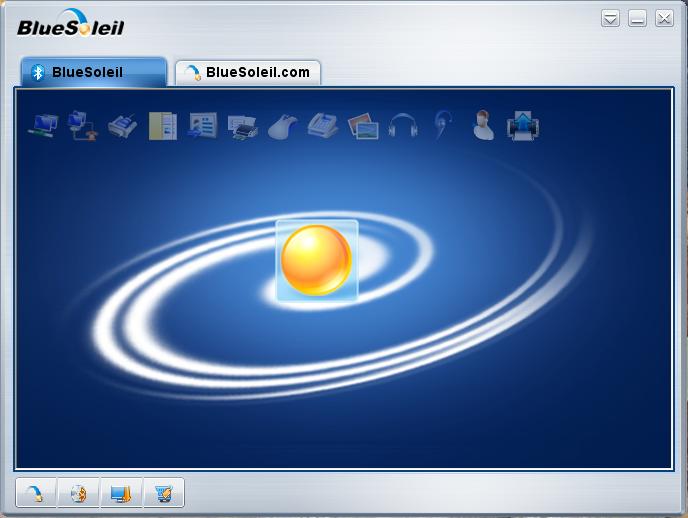
BlueSoleil 5.0.5 is a milestone in the BlueSoleil history. More friendly interface, easy-to-use, more widely compatible... The biggest change than our earlier versions is that BlueSoleil 5.0.5 has dual graphic interface, classic BlueSoleil GUI and Windows explorer GUI. Classic BlueSoleil GUI presents users the Bluetooth connection environment in an intuitive "Bluetooth space / orbit Soleil (the sun)" graphical user interface. Within this intuitive environment, users can easily click "My local Soleil" device to start to search other surrounding Bluetooth device, which are shown on the orbit. Bluetooth connection can be setup by simply clicking the other Bluetooth device icon. A line will be shown between the Soleil and the device to indicate the connection.


http://www.mediafire.com/?4x1ijemjzp4


Powered by Qumana


Minggu, 10 April 2011

Software Tool BSOD


Have you experienced a BSOD when using Windows OS. I myself often experience it, we need to know, in order to solve them. but there are times that we do not expect a BSOD very quickly once we can not read it immediately restarted. we can not read the messages that exist in the BSOD, then we need this Sotware

http://www.ziddu.com/download/14548538/bluescreenview_setup.exe.html

Powered by Qumana

Selasa, 15 Februari 2011

Remove Wat 2.2.5


INFO:

This is a little tool
to remove WAT (Windows Activation Technologies)
completely from the
OS, whilst still retaining genuine status and receiving
all updates
(optional aswell).
Installion and Use:
1. Run as Adminstrator
2. Click on Remove WAT button

To Return Windows 7 to Original
State:
1. Run as Adminstrator

Minggu, 23 Januari 2011

ARTAV Antivirus


two thumbs, make this one antivirus program that was labeled ARTAV Antivirus which is a subsidiary progremer junior high school in bandung
http://artav-antivirus.com

Senin, 03 Januari 2011

Antivirus For Mobile 2.0

Kaspersky Anti-Virus for Symbian OS is an anti-virus solution for smartphones based on the Symbian platform. The product offers the following functionality to users:
• real-time scanning of all incoming objects, transferred by means of wireless connections (infra-red port, Bluetooth), EMS and MMS messages, during synchronization with a personal computer and loading files through a browser;
• real-time scanning of files, before their opening using the smartphone interface
• real-time scanning of programs, before their installation using the smartphone interface
• scan the smartphone’s file system on demand or on schedule
• selective scan of folder or file
• scan hidden and system folders
• an option to unpack and scan content of Sis-archives
• an option to scan the smartphone’s ROM
• an option to move infected files to quarantine
• display information on anti-virus databases
• request information about the detected infection
• represent the current protection mode
• update anti-virus databases on demand or on schedule via GPRS-Internet, WAP, phone browser or from a local folder
• schedule tasks to be performed by the product
• Unwanted SMS and MMS messages blocking
• creation of “Black” and “White” user lists
• provide the user with built-in help
The product has a user-friendly and intuitive user interface.
The user can customize Kaspersky Anti-Virus Mobile settings, monitor current protection status, and view application logs with the results of application activities.

http://www.ziddu.com/download/13246301/AntiVirusForMobile20.rar.html

Related Posts with Thumbnails